

Chat And Work Need Different Product Contracts
By wGrow Project Team ·
The Architectural Admission
OpenAI has split its product line into distinct surfaces for open-ended chat, canvas-style document editing, and coding work, rather than routing everything through one conversation thread. Anthropic ships Artifacts alongside its chat. This isn’t a UI refresh. What it reflects is a harder constraint: a linear text feed can’t hold the state a multi-step deliverable needs, and splitting the surface is the practical fix for that limit.
We got there the hard way, running agent crews for finance and CRM clients. A chat window is open-ended, linear, and ephemeral by design. That’s correct for brainstorming. It’s wrong for a task with a start state, a set of required inputs, and a defined end state. When a user tries to run a five-step reconciliation process inside a scrolling text thread, the failure isn’t a model-quality problem — it’s a missing state layer. Chat has no schema, no version history a business can audit, no way to say “this step is done, don’t redo it.” Enterprise work needs all three, and it needs them at the same time.
Defining the Product Contract for Work
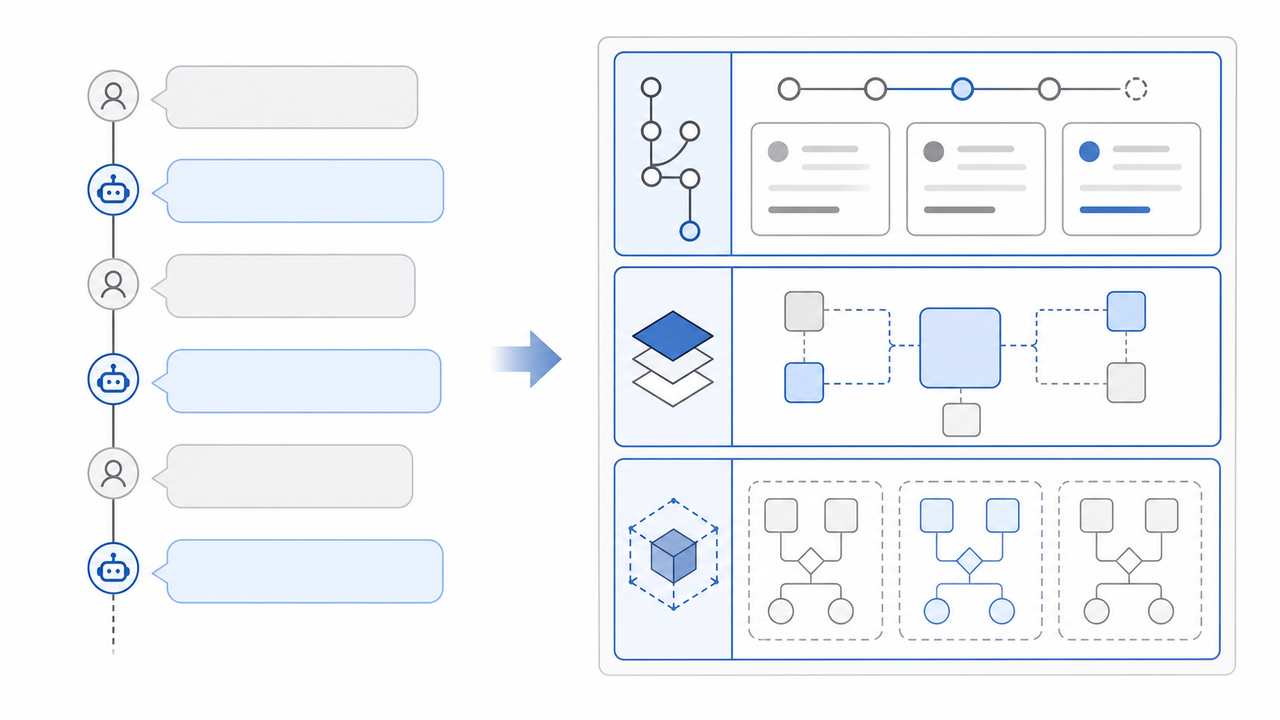
A chat session and an execution context are different products wearing the same font. Chat tolerates ambiguity because a human on the other end fills gaps in real time. Deliverable work doesn’t get that luxury — it needs a rigid contract: typed inputs, a predictable artifact shape on output, acceptance criteria that don’t move mid-task.
None of this is new AI theory. It’s old computer science. You don’t patch a codebase by describing changes in prose and hoping the file updates itself — that’s precisely why Codex exists as its own surface, with a diff view and a file tree, rather than a bigger chat box bolted onto the side. You don’t build a financial model inside a continuously scrolling conversation either. Both need a canvas with boundaries, somewhere state gets held, mutated, and checked against a schema before anyone signs off on it.
For product managers building on LLMs, the shift that actually matters is this: stop designing conversational engines and start designing delivery pipelines that happen to accept natural language as one input channel among several. That costs more upfront — a dedicated execution surface takes real design work a chat wrapper never demands — but it’s the price of building something a business can rely on for repeatable, auditable work.
Measuring Success by System State Changes
The metric enterprise buyers actually care about isn’t how fluent the model’s response reads. It’s whether the system state changed correctly. Sounds pedantic until you’ve built a CRM crew and watched what happens when it isn’t.
Our CRM crew ingests call transcripts. It doesn’t hand a rep a nicely written summary to retype into Salesforce fields by hand — that’s exactly where transcript summaries go to die in a chat-first workflow: the summary sits as another block of text a rep has to read and re-key, not a state change the system can validate on its own. Instead it proposes structured state changes: this contact’s stage moves from Qualifying to Proposal, this field gets a new dollar figure, this follow-up date gets set. The interface is a diff, not a chat bubble. It shows the before and after value for every field the call touched.
Schema validation runs before a human ever lays eyes on that diff. Type mismatches, malformed dates, hallucinated field names — all of it gets caught at the agent layer, programmatically, before review. By the time a reviewer looks at the proposed change, it’s already guaranteed to be a syntactically valid CRM operation. The human approves business judgment; they don’t proofread data types. That separation is the whole point, and chat simply can’t replicate it — chat has no concept of “reject this one field, accept the rest.”
The Approval Gate as a Primary Product Surface

Our finance reconciliation crew makes this even harder to miss. It ingests bank statements and ledger exports, matches transactions, flags exceptions, and produces a finalized reconciliation PDF for a controller to sign. None of that fits inside a chat thread, because chat has no native concept of an approval gate. Reconciliation needs fixed inputs — a specific statement period, a specific ledger export — processing time, a generated artifact, and a hard stop where a named human puts their name on the output.
That approval step isn’t a compliance box bolted onto the end of a prompt chain. It’s the product. Everything upstream — the matching logic, the exception flags, the PDF generation — exists to make that one approval moment fast and defensible. Designing for work means designing for interruption, right at the point where a human’s judgment outweighs the model’s. The UI has to support stop-and-go: build, pause, wait for signature, resume. That cadence doesn’t map onto a single scrolling window. It never did, which is exactly why forcing it into one was the mistake.
Escaping the Omnipotent Text Box
For roughly two years, the industry treated the chat box as a universal interface — one input field for everything from “explain quantum entanglement” to “reconcile Q3 accounts payable.” OpenAI splitting its product line across ChatGPT, canvas-style document editing, and Codex reads as the market correcting that assumption in public. Users don’t want to chat with their enterprise software. They want it to execute the work correctly and hand them one clear moment to say yes or no.
If you’re building an LLM application meant to produce something a business will act on, don’t start with a chat box and hope a workflow emerges from it. Start with the artifact you need to produce, the inputs it requires, the schema it must satisfy, and the point where a human has to approve it. Build that execution context first. The chat window still earns its keep — just not here. Save it for brainstorming, and build the rest like software.