

Spreadsheet Agents Need Cell-Level Evidence
By wGrow Project Team ·
A financial controller does not care how polite your LLM is. When end-of-month reconciliation closes, the controller signs the workbook. Not the chat transcript.
That distinction exposes a core flaw in how most spreadsheet agents are being built today.
The Chat Transcript Is Not the Audit Trail

Engineering teams are shipping fast. Agentic workflows are being built to automate reconciliations, flag variance anomalies, and generate period-close summaries — and the default interface is almost always chat. User prompts the agent. Agent runs a script. Agent replies with a summary of what it changed.
This architecture undermines the most fundamental finance controls.
Chat interfaces are optimised for information generation. Enterprise finance runs on information verification. Those disciplines pull in opposite directions, and conflating them creates a structural problem no amount of prompt engineering can fix.
If an agent modifies a cell, the reviewer needs a deterministic trail back to the prompt that triggered the change, the formula the agent generated, the source tab it pulled from, and any value it overrode. Without that provenance chain, the agent is not a productivity tool — it is an uninsurable liability sitting inside a workbook that a human being will eventually sign.
Lessons from Legacy VBA and 2018 SME Integrations
The underlying problem predates LLMs by decades. Spreadsheets occupy an uncomfortable dual role in enterprise finance: simultaneously the user interface and the system of record. Most AI development ignores this completely.
In a 2018 SME accounting integration we deployed, the finance team exported ERP data into Excel every day — manually massaging the numbers before month-end consolidation. The ERP held the transaction log. Excel held the truth the CFO actually reviewed. Our job was to replace the VBA monoliths driving that process.
The client’s hard requirement was not processing speed. It was cell override tracking.
When a human or a macro altered a calculated field, the system had to record three things: the previous value, the timestamp of the change, and a justification text entered by the operator. Every override was visible to the next reviewer in the chain. The CFO could walk backwards from any cell to the original ERP export and understand exactly what happened between the two states.
This was not aspirational. It was a condition of the client’s external audit. We built it with Excel’s built-in comment API and a lightweight audit log written to a hidden worksheet tab — nothing exotic, nothing proprietary.
Every agentic workflow we tested bypassed this entirely. Those workflows had less built-in accountability than the legacy VBA replacement we shipped in 2018. That is not a minor oversight. It is an architectural regression.
The openpyxl Blind Spot in Agentic Crews
We recently ran tests with agentic finance crews built in Python. The objective: process raw operational data — purchase orders, invoice records, intercompany allocations — into formatted financial summaries. Standard monthly close material.
Agents in these workflows typically reach for pandas or openpyxl to edit XLSX files directly. The pattern is clean from an engineering standpoint: read the source, apply transformations, write the output. Fast. Reproducible given identical inputs. And it fails the audit test immediately.
The agent reads the prompt, executes the Python logic, and silently overwrites the file. The business user receives the final XLSX. They cannot verify the logic without reading the Python script or reverse-engineering the output by hand. No diff view. No cell-level annotation. The source prompt exists only in the chat thread — which is not attached to the file and will not be present when an auditor opens the workbook six months later.
Black-box execution ending in a saved file rarely survives audit scrutiny. A wrong formula pushed across 5,000 rows without an audit flag does not produce a wrong cell. It produces a wrong ledger — and that error compounds through every downstream report that draws from it.
Mapping Provenance to Cell Metadata
- cell_ref
- — Reconciliation!G42
- prior_val
- — 10,500.00 (ERP Export)
- new_formula
- — =F42 * VLOOKUP(B42, FX_Rates, 2, FALSE)
- agent_prompt
- — "Convert row 42 to SGD using the FX tab"
- timestamp
- — 2024-10-14T09:22:10Z
The fix is not a better chat interface. It is a change in how agents interact with the spreadsheet runtime itself.
Stop building agents that output raw CSVs. Start building agents that generate precise, structured workbook updates — changes that carry their own reasoning. A reviewer clicking a modified cell should see:
- The original value from the ERP export or upstream source tab
- The formula the agent generated, written out explicitly
- The name of the source tab or external reference the formula draws from
- The prompt that triggered the modification, stored as cell metadata or a linked comment
This creates a deterministic link between the natural language instruction and the spreadsheet output. It is not fundamentally different from what we built manually in 2018 — except the agent generates the provenance automatically on every cell it touches, rather than requiring a human operator to fill in a justification field.
openpyxl supports comment objects natively. Excel’s structured comment API allows arbitrary text. Neither requires a new file format or a proprietary runtime. The tooling already exists. The agentic layer is simply not using it.
The harder part is the formula itself. When an agent generates a formula, it must be stored in the cell as a readable Excel expression — not computed and replaced with a hardcoded value. A cell that reads =SUMIF(Transactions!B:B,"SVC-04",Transactions!D:D) is reviewable. A cell that reads 4,821.00 because the agent resolved it in Python is not.
The Shift to Structured Workbook Diffs
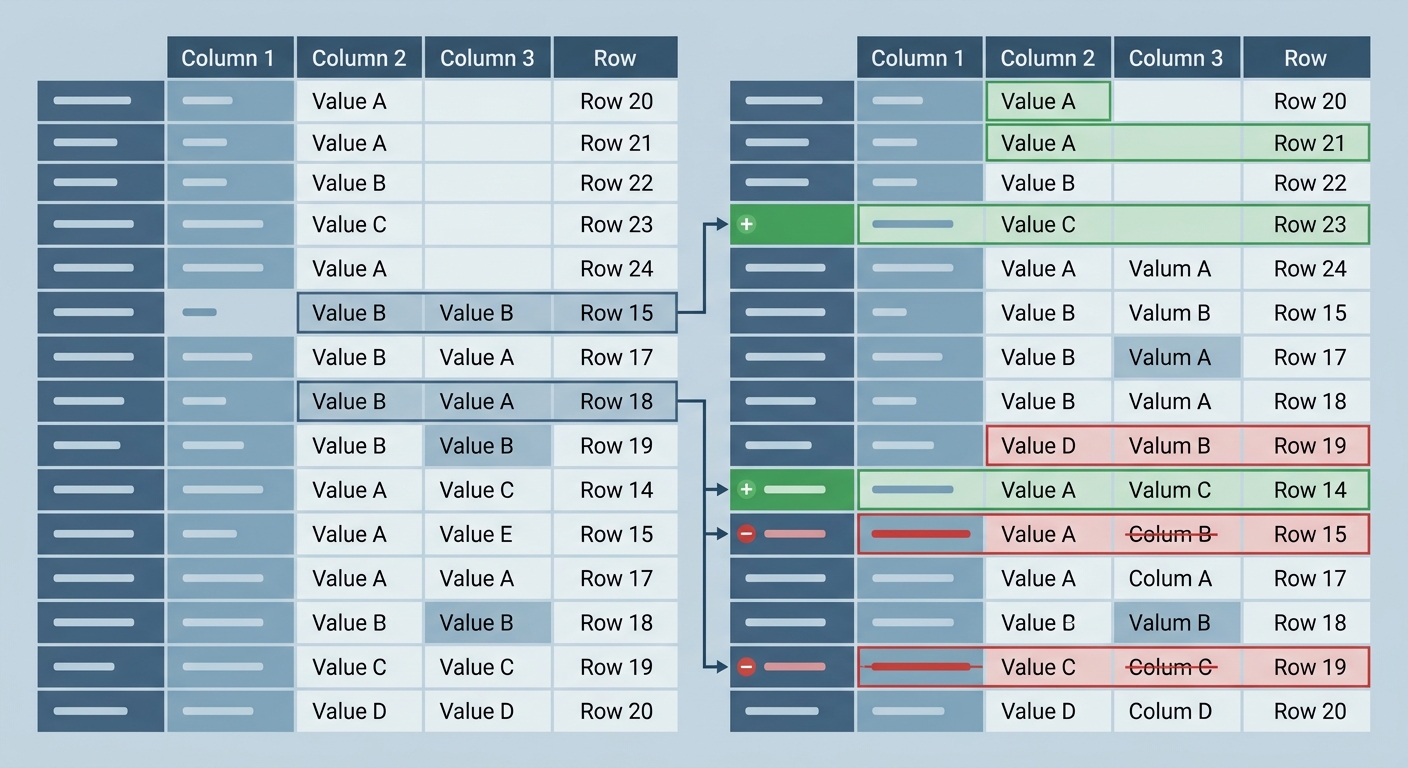
In regulated contexts, enterprise spreadsheet agents may eventually require cryptographically signed audit layers — a workbook state hash before execution, a signed record of every cell write, and a verifiable chain linking the prompt to the output file. The practical control requirement is narrower and harder to fake: any system that affects financial reporting needs a reconstructable record of what changed, when, and why. An agent that cannot produce that chain is not going to satisfy external audit at scale.
The immediate step — achievable now, without waiting for signed audit infrastructure — is building diff views for workbooks.
Stop building agents that blindly overwrite files. Build agents that propose a set of cell-level changes and present them for human approval before writing. The agent’s output should be a structured change manifest: cells, previous values, proposed new values, the formulas behind those proposals, and the source data each formula references.
Yes, this adds a review step. For high-volume, low-risk transformations, that will feel like friction. That trade-off is manageable. A month-end close that cannot be reconstructed for an auditor is not.
The reviewer sees a side-by-side comparison of the workbook before and after the agent’s proposed execution. They approve or reject at the cell level — not at the chat-thread level. Only on approval does the agent commit the write.
AI coding tools already do this for software engineers. A git diff shows exactly which lines changed, what they changed from, what they changed to. No engineering lead would accept a tool that silently overwrote source files with no diff and no commit log. Finance professionals require identical accountability for spreadsheets — applied to an environment where a single row error can misstate revenue.
The engineering teams that capture the enterprise finance market will not be the ones with the most capable formula generator. They will be the ones who treat Excel as a strict compliance environment with mandatory provenance — not a convenient data output format. That framing changes every design decision downstream: how the agent writes cells, how the reviewer approves changes, what the auditor sees when they open the file a year later.
The controller is not signing the chat log. Build accordingly.